Draw Your Cart Players Hub — Controls & Community
How to play well with others across PC, mobile, console, and tablet.
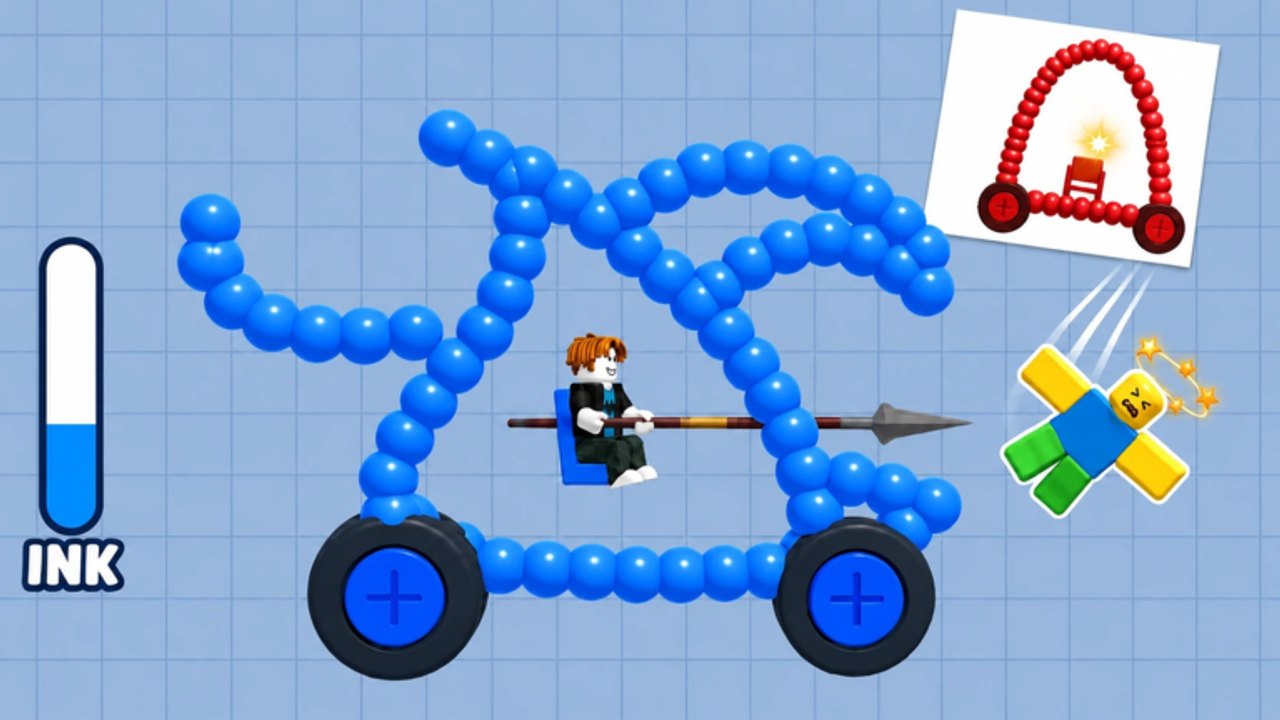
The Players Hub for Draw Your Cart! focuses on the human side of this SendyStudios Roblox experience: how different platforms feel, how to behave in servers capped at about six players, and when it makes sense to enter DUEL instead of staying in the open scrap. Unlike character-roster games, Draw Your Cart does not hand you a fixed hero list. You are the player-creator—your drawn cart, ink upgrades, skins, and fight habits define your identity in lobby.
Start with the detailed input guide: Controls. Then use Getting Started for the first-session loop, the Tier List Hub for weapon and frame ideas, and the Tools Hub for checklists before fights and bosses.
Who this hub is for
- New players who need platform-specific comfort tips before competing.
- Returning players who want cleaner etiquette in crowded six-player matches.
- Competitive players deciding when DUEL is worth the time versus farming wins toward the boss every ten victories.
- Groups coordinating quests, ink upgrade priorities, and fair rematches.
Platform differences that matter
Draw Your Cart runs on Roblox across PC, mobile, console, and tablet. The core loop—draw with limited ink, fight by driving and swiping, survive knockoffs and water, break parts, upgrade ink, equip skins, complete quests—is shared. The feel is not identical:
- PC usually offers the finest stroke control and camera comfort. Ideal for long spears, thin braces, and precise cannon aiming when those tools appear.
- Mobile prioritizes large readable buttons and forgiving shapes. Thick triangles and simpler spears often beat microscopic detail work on a small screen.
- Tablet sits between phone and PC: more drawing space than a phone, still touch-based aiming during fights.
- Console depends on stick aiming and face-button fight prompts. Practice steering arcs in empty space before a serious DUEL.
If a friend on PC keeps beating your phone cart with needle spears, switch to sturdier Cart Builds rather than blaming skill alone. Platform variance is real.
Six-player server etiquette
Small lobbies mean every player’s behavior is visible. Good etiquette keeps queues fun and reduces needless rage quits:
- Finish your draw at a reasonable pace. Others wait on the shared cadence. Practice a repeatable S-tier triangle so you are not redesigning art for five minutes every round.
- Do not grief AFK or learning players with endless spawn camping when the lobby is clearly casual. Save tryhard energy for DUEL or consenting rematches.
- Call your intent in chat if you can — “boss prep,” “learning,” or “duel?” helps strangers match expectations.
- Respect knockoff space near water. Spamming edge traps is a valid tactic, but stacking the entire lobby into softlocks is poor form.
- After a boss wipe, give redraw time. Bosses every ten wins are stressful; rushing people mid-brace creates avoidable losses.
- Skins are not skill. Fancy hats, balls, wheels, or flags do not entitle anyone to insult beginners.
Healthy servers make it easier to complete quests that unlock around ten wins and to learn from stronger cart designs without toxicity.
When to DUEL
DUEL shines when you want a clean read on your build without six-way chaos. Consider queueing or accepting a duel when:
- You just unlocked an ink upgrade and need a controlled test.
- You are practicing a long-spear or ram-blade matchup from the Weapons Tier List.
- A boss is not imminent and you prefer focused reps over streak noise.
- You and a friend want a fair rematch after a disputed free-for-all.
Stay in open multiplayer when you are farming the ten-win boss cadence, completing social quests, or learning how chaotic knockoffs feel. Mixing both modes teaches different skills: open lobbies train awareness; duels train pure design and swipe timing.
Community habits that improve win rate
Watch how high-win players spend ink. Most do not empty the bar on decoration. They secure rider and wheels, add one honest weapon, then stop. Review the Tools ink budget checklist until that habit is automatic. Share successful silhouettes with friends, but rewrite them yourself—copying strokes teaches less than rebuilding the logic.
Follow patch conversations via Updates and official links on the Links Hub. Creator-side content from adamdoesroblx / SendyStudios can reveal new UI prompts; always re-check Controls after interface changes.
Suggested player roadmap
- Learn inputs on your device.
- Master a minimal triangle plus spear.
- Practice etiquette and pacing in six-player rooms.
- Add DUEL sessions for clean feedback.
- Prep braced builds before boss milestones.
- Spend upgrade currency on ink capacity before cosmetics.
- Revisit tier lists when your losses cluster around reach or breakage.
The Players Hub is your home for how people play, not just what carts exist. Strong communities make Draw Your Cart more than a drawing toy—they turn it into a readable competitive craft.
Frequently Asked Questions
Quick answers for Draw Your Cart players.
Where are the Draw Your Cart controls?
Open the Controls page under this hub for PC, mobile, console, and tablet notes covering drawing, driving, fighting, and DUEL. UI labels can change after updates.
How many players are in a server?
Lobbies are small—about six players maximum—so pacing, etiquette, and clear intent matter more than in huge Roblox experiences.
Should I always duel?
No. Use DUEL to test builds and timing. Use open multiplayer to farm win streaks, quests, and boss readiness every ten wins.
Does platform choice affect fairness?
Inputs differ. PC often draws finer lines; touch and sticks favor thicker, simpler shapes. Adapt your cart build to your device instead of mirroring PC needle designs blindly.